Clustering
Overview
BifroMQ clusters are built on two logical layers: the Underlay Cluster, which provides decentralized membership and failure detection, and the Overlay Cluster, which hosts functional services such as MQTT brokering and data persistence. This guide focuses on practical steps to deploy and operate a BifroMQ cluster.
Prerequisites
- Java 17 or later installed on all nodes.
- Sufficient CPU and memory for the expected workload.
- Required ports opened in firewalls (see configuration below).
Step 0 – Understand the Two-Tier Cluster Topology
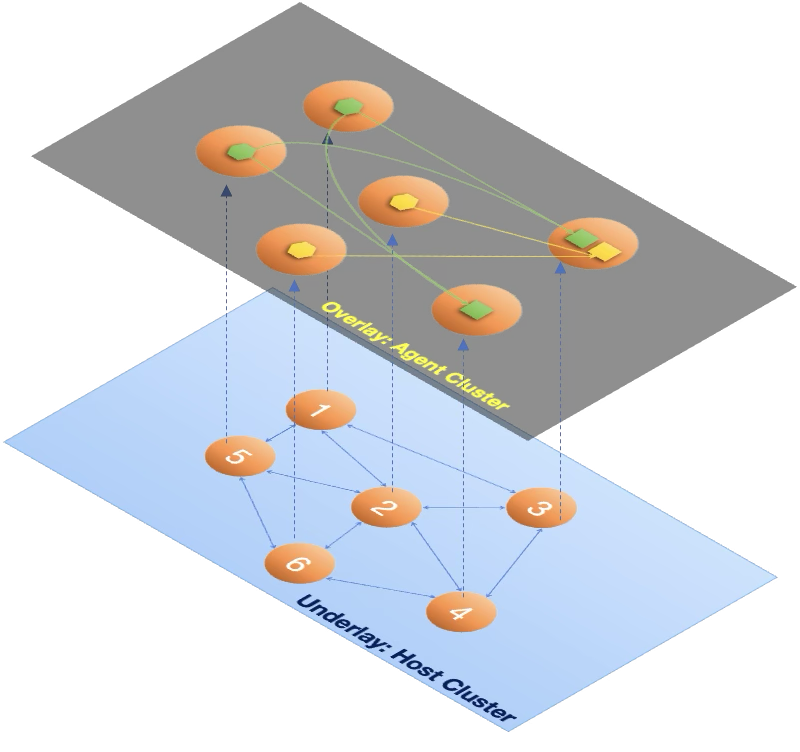
BifroMQ uses a two-tier clustering architecture, consisting of:
- an Underlay Cluster, which provides decentralized membership, failure detection, and topology information, and
- multiple Overlay Service Clusters, enabled selectively inside each node to provide MQTT-related functionalities.
In practice:
- Every BifroMQ node must first join the Underlay Cluster.
- Overlay services (e.g., MQTT broker, distworker, inboxstore, retainstore) are optional and communicate directly with their peers once enabled.
Step 1 - Prepare clusterConfig
The clusterConfig section in config file controls the Underlay Cluster. Key fields include:
clusterConfig:
  env: "Test"
  host:
  port:
  clusterDomainName:
  seedEndpoints:
Field details:
env: Logical cluster identifier. Nodes must share the same value to join.host: IP to bind for inter-node communication; leave blank to auto-select a local address.port: Port for membership messages. For seed nodes, set an explicit port to simplify discovery.clusterDomainName: Optional DNS domain for resolving seed nodes in container/Kubernetes environments.seedEndpoints: Comma-separatedIP:portlist of seed nodes to join at startup.
If you prefer DNS-based discovery, set clusterDomainName and ensure the cluster communication port is fixed and identical among all cluster nodes.
Firewall note: Besides clusterConfig.port, BifroMQ uses dedicated ports for inter-cluster RPC (e.g., RPCServerConfig.port). If not set explicitly, these ports are randomly chosen and may be blocked by firewalls. Refer to the full configuration manual to pin ports and adjust firewall rules.
Step 2 - Select overlay services
Overlay services are enabled via configuration flags:
| Service | Config key | Description (see config manual) |
|---|---|---|
mqttserver | mqttServiceConfig.server.enable | Enable MQTT server |
distserver | distServiceConfig.server.enable | Enable Dist server |
distworker | distServiceConfig.worker.enable | Enable Dist worker |
inboxserver | inboxServiceConfig.server.enable | Enable Inbox server |
inboxstore | inboxServiceConfig.store.enable | Enable Inbox store |
retainserver | retainServiceConfig.server.enable | Enable Retain server |
retainstore | retainServiceConfig.store.enable | Enable Retain store |
sessiondictserver | sessionDictServiceConfig.server.enable | Enable SessionDict server |
apiserver | apiServerConfig.enable | Enable HTTP API server |
By default, all services are enabled in a BifroMQ process (standalone cluster). To run an independent workload cluster, disable services you do not need using their config keys. For example, a seed-only node can act purely as an Underlay Cluster member:
clusterConfig:
  env: <CLUSTER_ENV>
  host: <SEED_HOST>
  port: <SEED_PORT>
  seedEndpoints: <SEED_LIST>
# Disable all overlay services on a seed-only node
mqttServiceConfig:
  server:
    enable: false
distServiceConfig:
  server:
    enable: false
  worker:
    enable: false
inboxServiceConfig:
  server:
    enable: false
  store:
    enable: false
retainServiceConfig:
  server:
    enable: false
  store:
    enable: false
sessionDictServiceConfig:
  server:
    enable: false
apiServerConfig:
  enable: false
Step 3 - Launch and form the cluster
Start seed nodes
- Set
envto the same value on all seed nodes. - Specify each seed node's own IP in
hostand use a fixedport. - Leave
seedEndpointsblank on the first node; include it on subsequent seed nodes. - Start the process:
./bin/standalone.sh start
Start additional nodes
For each additional node, set the same env and point seedEndpoints to the seed nodes (by IPs or via clusterDomainName). Start the node via same command:
./bin/standalone.sh start
Verify cluster membership
- Check
info.logto confirm nodes recognize each other, e.g.:
AgentHost joined seedEndpoint: 10.0.0.2:9000
- If
apiserveris enabled (seeapiServerConfig.*in the config manual), query any BifroMQ node exposing the API to list Underlay Cluster members:
curl http://<API_HOST>:<API_PORT>/cluster
Sample response:
{
  "env": "Test",
  "nodes": [
    {
      "id": "...", // unique node id in the underlay cluster
      "address": "10.0.0.1", // bind address
      "port": 8890, // cluster bind port
      "pid": 3098996 // process id of this node
    },
    { "id": "...", "address": "10.0.0.2", "port": 42855, "pid": 45037 }
  ],
  "local": "..." // id of the local node
}
Step 4 - High availability and scaling
BifroMQ achieves high availability by running redundant instances of both stateless and stateful overlay service clusters.
Each category uses different mechanisms for reliability and scaling.
Stateless Service Clusters
Stateless services do not maintain persistent state. They include:
mqttserverdistserverinboxserverretainserversessiondictserverapiserver
High availability relies on traffic distribution:
Client-facing services
mqttbrokerandapiservershould be placed behind an L4 or L7 load balancer.- The load balancer ensures seamless failover and horizontal scaling.
Internal stateless services
distserver,inboxserver, andretainserveruse RPC for communication.- Traffic distribution and routing behaviors are handled by BifroMQ’s traffic governance mechanisms (documented separately).
Because stateless services maintain no data, they can be scaled in or out at any time without special procedures.
Stateful Service Clusters
Stateful services rely on the base-kv storage engine:
distworkerinboxstoreretainstore
These services provide strong consistency, replicated shards, and automatic sharding across multiple nodes.
Reliability model
- Shard replication with quorum semantics enables continued operation even if nodes fail.
- The Balancer framework manages:
- shard placement
- leader distribution
- range splitting and merging
- replica redistribution
Customizable balancer strategies
The Balancer framework is highly extensible and allows operators to implement custom strategies tuned to workload patterns, performance goals, or SLA requirements.
Scaling stateful services
- When new nodes with stateful services enabled join the cluster, the Balancer gradually redistributes shards.
- When scaling in, ensure remaining nodes can maintain quorum before removing capacity.
- Shard movement and balancing occur online, without interrupting services.
Step 5 - Monitoring and troubleshooting
- BifroMQ exposes extensive metrics via Micrometer covering underlay/overlay status and load; integrate them with your monitoring system (e.g., Prometheus) per the observability guide.
- The API Server provides cluster landscape and traffic/load governance APIs; use the relevant docs to query and manage these rules.